The simplest way to measure a home’s electricity use is to take two electricity-meter readings at known times and subtract the first from the second. This gives the energy imported from the grid in kilowatt hours. A smart-meter in-home display can then show when demand rises, while a plug-in energy monitor can measure an individual appliance over a complete cycle.
No single method answers every question. The billing meter measures the whole property’s grid import, an in-home display shows near-real-time household demand, and an appliance monitor measures equipment connected through a suitable plug. Homes with solar panels or batteries need additional generation and storage data because electricity bought from the grid is not the same as all the electricity used in the home.
Decide what you want to measure
Start with a specific question. Different tools are suited to different measurements:
| Question | Best starting method | What it measures |
|---|---|---|
| How much electricity does the home use each day? | Electricity-meter readings | Total grid import between two readings |
| What happens when an appliance is switched on? | Smart-meter in-home display | Change in whole-home demand |
| How much does one plug-in appliance use? | Plug-in energy monitor | Energy passing through that monitor |
| How much does a fridge, washer or dryer use per cycle or day? | Plug-in monitor over a complete test period | Consumption including cycling and standby |
| How much does a hard-wired shower, cooker or heat pump use? | Equipment data, in-home display comparison or professionally installed sub-meter | Load that cannot be tested through a normal plug |
| When is electricity being used? | Supplier app or half-hourly smart-meter data | Import arranged into time periods |
| How much electricity does a solar home really consume? | Smart meter plus inverter and battery data | Grid import, generation, export and storage flows |
Write down the purpose and the test period before collecting figures. A ten-second live reading can reveal a kettle’s power, but it cannot show a fridge-freezer’s annual consumption. A full-day total can reveal background demand, but it may conceal which appliance caused it.
Understand watts and kilowatt hours
Electricity use is normally discussed using two related measurements:
- Watts and kilowatts measure power. They show how quickly an appliance is using electricity at that moment. One kilowatt is 1,000 watts.
- Kilowatt hours measure energy. They show the amount used over a period of time. Electricity meters and bills record kWh.
Power in kilowatts × time in hours = energy in kilowatt hours
A 2 kW heater running continuously for three hours uses 6 kWh. A 3 kW kettle running for three minutes uses 0.15 kWh because three minutes is 0.05 of an hour. The kettle draws more power at that moment, but the heater uses much more energy over the test period.
Rated power is only an estimate where an appliance cycles or varies its output. Thermostats, compressors, motors and electronic controls may reduce or stop demand during operation. Measure a complete representative cycle whenever possible.
Measure whole-home use with meter readings
The billing meter provides the most important whole-home figure. Take a reading, wait for a defined period and take another at the same time of day.
Later meter reading – earlier meter reading = electricity imported in kWh
For example, if the meter rises from 18,420 kWh to 18,455 kWh, the property has imported 35 kWh. If that covers seven complete days, the daily average is 5 kWh.
- Photograph or record the meter reading, date and exact time.
- Note unusual conditions such as electric heating, guests, laundry, EV charging or time away.
- Repeat the reading after 24 hours for a daily total or after seven days for a more stable average.
- Use the same time of day so the periods are directly comparable.
- Repeat in different seasons if heating, cooling or lighting is electrically powered.
A week normally gives a more useful baseline than one day because it includes workdays, weekends and several appliance cycles. Compare like with like. A winter week in an electrically heated home should not be used as the expected summer baseline.
Read the correct meter register
A single-rate meter has one main import reading. Economy 7, Economy 10 and other time-of-use arrangements may have two or more registers. Record every register required by the supplier and keep peak and off-peak consumption separate when calculating cost.
Citizens Advice provides instructions for standard digital and dial meters. Its separate smart electricity-meter guide covers common button and display layouts. Meter models differ, so use the supplier or manufacturer’s instructions if the display does not match the examples.
If a supplier asks for a formal reading, take it from the electricity meter rather than the portable in-home display. Check the meter serial number against the bill, particularly in a block of flats or a communal meter cupboard.
Use a smart-meter in-home display
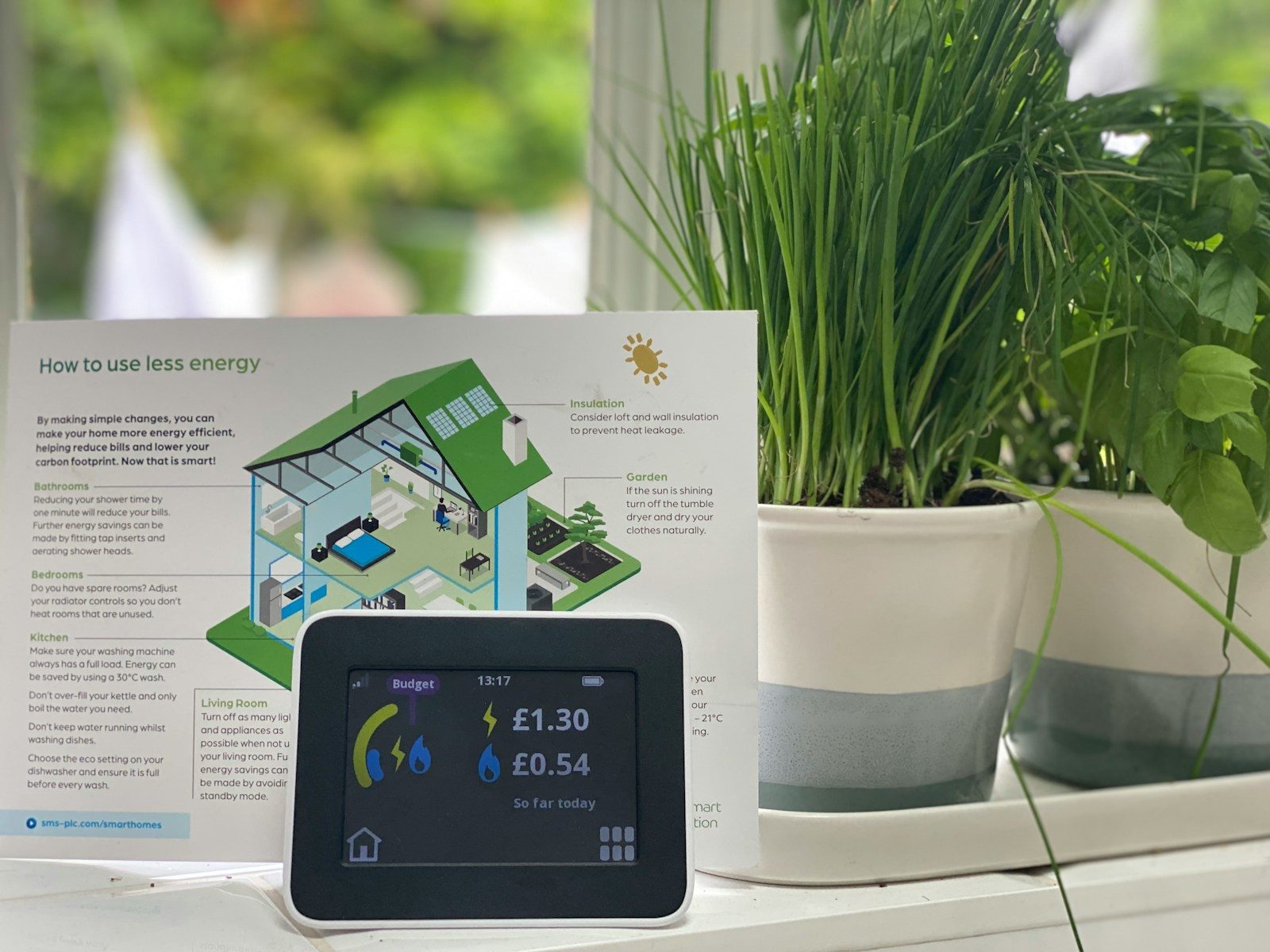
The in-home display, often shortened to IHD, is the small portable screen supplied with a smart meter. It is not the smart meter itself. It can show current electricity demand, energy used over different periods and an estimated cost.
Citizens Advice says electricity information on an IHD normally updates every ten seconds. This makes it useful for comparing larger loads:
- Choose the electricity-only screen and display power in kW if the option is available.
- Record the normal background figure before starting the test.
- Switch on one appliance while leaving other large loads unchanged.
- Wait for the display to update and record the new figure.
- Subtract the baseline to estimate that appliance’s demand at that moment.
If the baseline is 0.35 kW and it rises to 2.35 kW when a heater is switched on, the observed increase is about 2 kW. This is a power measurement, not the heater’s total energy use. Multiply by its operating time or observe the full session to estimate kWh.
Do not expect a small charger or standby device to produce a clear change when other loads are cycling. A fridge compressor, immersion heater or electric heating control can start during the test and distort the result. Repeat the test and compare consistent periods.
Treat displayed costs as estimates
The cost screen is only reliable if it holds the correct tariff and registers. Check the unit rates on the bill, particularly after a tariff change. Some displays do not represent complex time-of-use tariffs, solar generation or export clearly. The daily standing charge may also appear in the day’s cost even though it is not caused by an appliance.
The Energy Saving Trust’s smart-meter guide explains the role of the meter and display. A smart meter provides information but does not reduce consumption by itself. Savings depend on identifying and changing avoidable use.
Measure an appliance with a plug-in energy monitor
A plug-in electricity monitor sits between a wall socket and an ordinary plug-in appliance. Depending on the model, it can show live watts, cumulative kWh, operating time and estimated cost. It is particularly useful for equipment that cycles or has several modes.
| Appliance type | Useful test period | What to record |
|---|---|---|
| Kettle, toaster or microwave | One complete use | Total kWh for the event |
| Washing machine or dishwasher | One complete representative programme | kWh per cycle and programme used |
| Tumble dryer | One complete load | kWh, load size and starting moisture |
| Fridge or freezer | At least 24 hours, preferably several days | Average kWh per day |
| Television, computer or games console | A normal session plus standby | Active watts, session kWh and standby watts |
| Router, pump or other continuous load | 24 hours or seven days | Daily average and total kWh |
Use the same programme, load and conditions when comparing two tests. A short wash cannot be fairly compared with a hotter intensive cycle, and a lightly used fridge on a cool day will not represent a hot kitchen during summer.
Check the monitor’s maximum current and power rating before use. Follow its instructions and plug it directly into a suitable socket where required. Do not use it with equipment that exceeds its rating, a damaged socket or an inappropriate chain of adaptors. It cannot measure a hard-wired cooker, electric shower, heat pump or EV charger.
Use smart plugs carefully
Some smart plugs include energy monitoring. They can be convenient for recording long-term use and switching suitable appliances, but not every smart plug measures energy and accuracy varies. Confirm that the product is intended for the appliance’s load and bought from a reputable retailer.
Do not use remote switching for an appliance that should not restart unattended, produces heat or requires supervision. Never use a smart plug to bypass an appliance’s own safety controls. Follow the instructions for heaters, cooking equipment, washing machines, tumble dryers and medical devices.
Measure hard-wired and high-demand equipment
Electric showers, cookers, immersion heaters, storage heaters, heat pumps, solar inverters and many EV chargers are connected to fixed wiring. A normal plug-in monitor is not suitable. Use one or more of these approaches:
- check the equipment’s controller, app or installer portal for recorded kWh;
- compare the whole-home IHD immediately before and during a stable operating period;
- compare half-hourly data with known heating, hot-water or charging schedules;
- read a dedicated sub-meter if one was installed; or
- ask a registered electrician or competent installer about safe circuit-level monitoring.
A clamp-style whole-home monitor can estimate current through an incoming conductor and send data to a display or app. Installation location matters. Do not remove a consumer-unit cover, reach near exposed conductors, disturb the supplier’s equipment or break a meter seal. Ofgem warns that meter tampering is illegal and dangerous. Use a competent installer wherever access would involve live electrical equipment or fixed wiring.
Calculate appliance running cost
Once an appliance’s energy use is known, multiply it by the applicable electricity unit rate:
Energy used in kWh × unit rate in pounds per kWh = estimated energy cost
If one cycle uses 1.5 kWh and the applicable rate is £0.25 per kWh, its electricity cost is about £0.375, which rounds to 38p. Use this only as an example calculation. Insert the actual rate from the household bill rather than a national average.
For a time-of-use tariff, split consumption between the relevant peak, off-peak or variable periods and apply each rate separately. The Ofgem guide to electricity and gas bills explains unit rates and standing charges. The standing charge is payable each day and should not be assigned to an individual appliance.
Use energy labels and manufacturer data
Energy labels provide standardised consumption figures for many appliances. They are valuable when direct measurement is inconvenient or when comparing replacements:
- Fridges and freezers: annual consumption in kWh.
- Washing machines: consumption per 100 Eco 40-60 cycles.
- Dishwashers: consumption per 100 Eco cycles.
- Televisions and displays: consumption per 1,000 hours, with separate information for relevant display modes.
- Washer-dryers: separate information for wash-only and wash-and-dry operation.
Translate the label into realistic household use. If a washing-machine label gives 50 kWh per 100 cycles, the stated programme averages 0.5 kWh per cycle under the label test. Two hundred comparable cycles would therefore represent about 100 kWh. Other temperatures, programmes and load sizes may differ.
The Energy Saving Trust’s appliance-label guide explains the current A to G system and the information shown for each product category. Use the consumption figure as well as the rating letter because a larger appliance may consume more than a smaller model in the same class.
Find background and overnight electricity use
Background demand is the electricity used when no obvious major appliance is operating. It can include refrigeration, routers, security systems, pumps, ventilation, chargers, clocks, standby electronics and heating controls.
- Choose a normal period when cooking, laundry, electric heating and EV charging are not running.
- Record the IHD’s electricity demand or take a meter reading.
- Switch off non-essential equipment one item or group at a time.
- Wait for the display to update and record each change.
- For greater accuracy, compare meter readings across several quiet overnight periods.
Do not switch off fridges, freezers, alarms, medical devices, essential communications, ventilation or equipment needed for safety simply to lower the baseline. Check instructions before disconnecting routers, recorders, smart-home controllers or devices receiving updates.
If the background remains unexpectedly high, look for immersion heaters, frost protection, heated towel rails, dehumidifiers, pumps, outdoor equipment, spare refrigeration and electric underfloor heating. Use schedules and measurements to identify the load rather than repeatedly switching circuits at the consumer unit.
Interpret half-hourly and supplier-app data
Many suppliers let smart-meter customers view electricity imported in half-hour periods. This is useful for locating patterns:
- a regular overnight block may correspond to storage heating, water heating or EV charging;
- a morning peak may reflect an electric shower, kettle and cooking;
- repeated daytime peaks may match laundry or dishwasher cycles;
- a steady winter increase may indicate electric space heating; and
- a new continuous band may point to an appliance or control that has been left running.
Half-hourly data shows when imported energy was used, not automatically which appliance used it. Keep a simple activity log for several days and compare it with the graph. Allow for reporting delays and check whether the figures are actual smart readings or estimates.
Measure electricity in a home with solar panels or a battery
A standard import reading shows electricity taken from the grid. It does not include solar electricity used directly in the home. Export is electricity sent out to the grid, while a battery can charge from solar or the grid and discharge later. Looking at import alone can therefore understate total household consumption.
Use the smart meter or supplier account for grid import and export, then use the inverter or energy-management system for solar generation, direct use, battery charging, battery discharge and state of charge. Make sure all figures cover the same dates and time zone. Avoid adding battery discharge to earlier generation or grid charging without accounting for the energy that originally entered the battery, as this double counts it.
Smart Energy GB explains that an in-home display normally shows electricity bought from the supplier rather than everything generated by solar panels. The exact information available depends on the meter, inverter, battery, tariff and installer setup.
Investigate an unexpected increase
First establish whether the bill uses actual or estimated readings and whether the opening and closing figures match the correct meter. Check the billing period, unit rate, tariff registers and meter serial number. Then take daily readings at the same time for at least seven days and record large electrical loads.
Check for seasonal heating, hot-water boosts, EV charging, guests, tumble drying, dehumidification and appliances that are running for longer than usual. Compare the IHD, plug-in monitor and supplier data. If consumption remains unexplained, contact the supplier before assuming the meter is faulty.
Citizens Advice’s faulty-meter guidance explains the checks and formal testing process. A supplier may ask for daily readings and could charge for testing if the meter proves accurate, so confirm the terms before arranging a test.
Home electricity-measurement checklist
- Define whether you need whole-home, appliance, circuit or time-of-use data.
- Record meter readings with the date, time and a photograph.
- Subtract the earlier reading from the later reading to calculate kWh.
- Record every register on a dual-rate or time-of-use meter.
- Use the IHD to identify live changes, not as the formal billing meter.
- Measure cycling appliances over a complete representative period.
- Check plug-in monitor and smart-plug load ratings before use.
- Use equipment data or professional sub-metering for hard-wired loads.
- Apply the actual tariff rate and keep the standing charge separate.
- Combine import, generation, export and battery data in a solar home.
- Never disturb meter seals, supplier equipment or live electrical parts.
- Keep heating, refrigeration, medical equipment and safety systems operating as needed.
Home electricity-measurement resources
- Citizens Advice standard meter-reading guide covers single-rate, dual-rate and dial electricity meters.
- Citizens Advice smart electricity-meter guide explains how to find import readings on common meter designs.
- Citizens Advice in-home display guidance covers live electricity data, historical views, budgets and standing charges.
- Citizens Advice appliance-monitoring guidance explains whole-home and plug-in energy monitors.
- Energy Saving Trust smart-meter guidance explains automatic readings, in-home displays and current rollout information.
- Energy Saving Trust appliance-label guidance explains efficiency classes and standardised consumption figures.
- Ofgem energy-bill guidance explains unit rates, standing charges and the main parts of a bill.
- Smart Energy GB smart-meter questions and answers explains grid import, export and what an in-home display usually shows in a solar home.
- Ofgem meter-tampering guidance explains why interfering with meters and supplier equipment is dangerous and illegal.